When can we start using SR?
Very soon. SR is in its final round of polishing and testing with schools. Register your interest and we'll contact you as soon as it's ready, set up your school and help you get started. Want to see it before then? Ask for a demo.
What do we get?
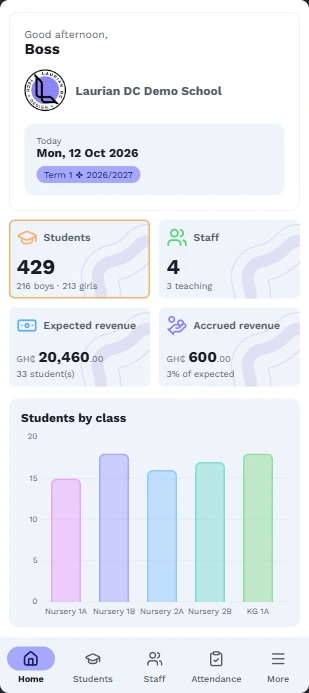
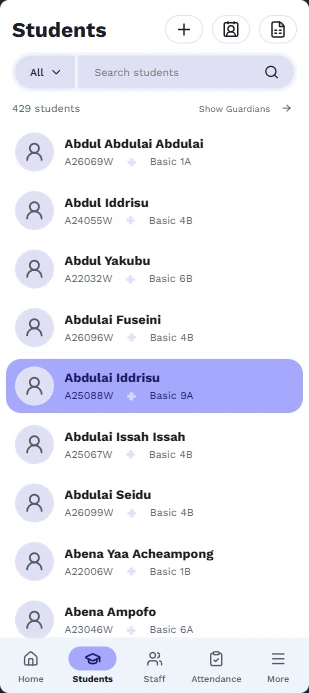
Two apps that share the same records. The web app at sr.lauriandc.com, where teachers, the bursar and the head work from their own phones or laptops. And the desktop app on the school PC for the office, which keeps working when the internet drops and syncs when it's back. Parents get the portal, if you switch it on.
How do you count students?
We count the students enrolled when you pay, and you choose the plan that covers that number. If you grow past your plan during a term, you won't be cut off. You simply move up a plan at your next renewal. Staff accounts are unlimited on every plan.
Do we need internet to use SR?
The web app needs internet, like any website. The desktop app on the school PC doesn't: it keeps working offline and syncs your changes when the connection comes back. It needs to go online at least once every 60 days to check the subscription.
How do we pay?
Online through Paystack, with Mobile Money (MTN, Telecel, AirtelTigo) or a Visa or Mastercard card. Prices are in Ghana cedis. SR is paid per term or per year. If your school prefers a bank transfer or an invoice, contact us.
When do we get our activation key?
We email it to you once your payment is confirmed, together with the download link and setup steps. Keep that email safe. For your security we store only a fingerprint of the key and can't look it up later. If you lose it, we can send you a new one.
How does renewing work?
Renew from the renewal page using your school code. The new time is added to the end of your current period, so you never lose days by renewing early. You don't need a new key, because SR picks up the new date the next time the PC is online.
What happens if our subscription ends?
You're never locked out of your own records. SR becomes read-only on the PC and on the web: you can still look at, print and back up everything, but not make changes, and syncing pauses. Your data is never deleted. Renew and everything picks up where you left off.
Is support included?
Yes, for as long as you subscribe: every update, and help by WhatsApp, email or a call whenever you need it.
We're getting a new PC. Can we move SR?
Yes. On the old PC open Settings > This PC > Licence > Remove from this PC, then activate the new PC with the same key and link it to your school: your data downloads to it. If the old PC is broken, write to us and we'll free the seat for you.
What if our PC breaks or is stolen?
Your records are safe. SR keeps them on our servers, backed up every night, so staff carry on in the web app and a new PC simply downloads everything. The PC's own copy is encrypted, and it can also save a backup every day to a USB stick. Only SR can open those files, so a thief can't read them.
Can we bring in our existing records?
Yes. SR gives you an Excel sheet for your classes: fill in your students and their guardians, and SR checks every row before importing it. When we set your school up, we help you enter your fee items, grading and any balances still owed from before.
Can parents see results and pay fees online?
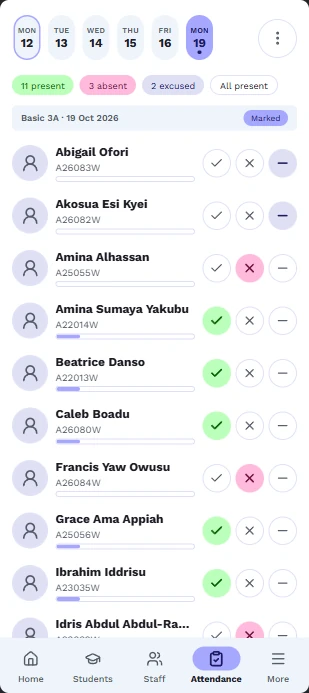
Yes. The parent portal lets parents sign in on their phones with a PIN and see each child's fees, receipts, results and attendance. If your school chooses, they can also pay fees with Mobile Money. Payments go straight into your school's own account through Paystack, and SR takes no cut. Each part is off until your school switches it on in Settings, so you decide what parents see.
Who can see what?
Each login has a role. Admins run everything; heads of department oversee their level or subject; teachers see their own classes; bursars handle fees. Parents only ever see their own children, in the parent portal. Our guide Who can do what in SR (PDF, 5 pages) explains every role.
Can SR send SMS to parents?
Yes. SR can text parents automatically when a child is absent or when a payment is received, and you can send fee reminders or notices to a class or the whole school. Messages come from your school's own sender name once it's approved. You buy SMS credits inside SR, and nothing is sent until you switch it on.
Can we try it before buying?
Yes. Send us a message and we'll set up a demo school for you to explore, or walk you through it in person or on a call.
 SR
SR